
I’ve been working through finding new ways to solve some of the Impossible Challenges Labs that Portswigger posts. During my exploration, I discovered a sibling to the well-known Relative Path Overwrite (RPO) technique, which I have named Relative Path File Injection (RPFI). It is my hope that this new technique opens up new possibilities and sheds light on previously unexplored avenues for exploitation.
Background:
I have been investigating a category of vulnerabilities where it is possible to inject text into a webpage, but there are no known methods to execute JavaScript directly. One such scenario involves injecting content within a <frameset> tag when the equals sign (=) is filtered.
In this context, injecting JavaScript code within a <frameset> tag proves ineffective because the <frameset> tag was originally designed to be used as an alternative to the <body> tag. It was intended to contain only <frame> tags or <noframes> tags. Traditionally, web developers would either use a <body> tag or a <frameset> tag that encapsulated individual <frame> tags, each with its own <body>.
The <noframes> tag was commonly used to define a fallback <body> for browsers that did not support frames. However, in modern browsers, any content injected within a <noframes> tag is simply rendered as plain text, similar to how content within <noscript> tags is treated.
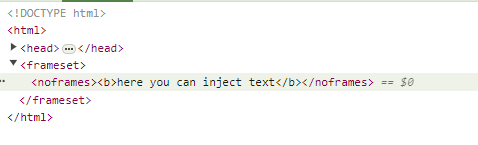
Here’s an example that demonstrates the limitation of injecting HTML into a <noframes> tag:
Inject payload into noframes tag
Portswigger Research lists a few similar scenarios in their Impossible Challenges Lab:
“innerHTML context but no equals allowed
You have a site that processes the query string and URL decodes the parameters but splits on the equals then assigns to innerHTML. In this context <script> doesn’t work and we can’t use = to create an event.”
“Injection occurs inside a frameset but before the body
We received a request from twitter about this next lab. It occurs within a frameset but before a body tag with equals filtered. You would think you could inject a closing frameset followed by a script block but that would be too easy.”
My first insight here was that these types of problems are easily solvable if Angularjs is available on the page because the Angularjs parser doesn’t care where in the page the Angularjs template string occurs. For example, you can inject a <noframes> tag with ng-app on it to instantiate Angularjs and execute Javascript.
| <frameset> <noframes ng-app> {{1+1}} </noframes> </frameset> |
This works because Angularjs parser doesn’t care that HTML doesn’t want us executing JavaScript here. The same could be done with Gareth Heyes Relative Path Overwrite (RPO) with CSS injection.
| <frameset> <noframes> *{ xss:expression(alert(1)); } </noframes> </frameset> |
The CSS parser operates independently of the HTML parser and focuses solely on identifying and parsing CSS code within a webpage. It (with some conditions) does not concern itself with the location or context of the CSS code. This behavior allows techniques like Relative Path Overwrite (RPO) to inject and execute JavaScript in unconventional locations.
Similarly, the AngularJS parser can execute JavaScript expressions embedded within AngularJS-specific attributes or bindings, regardless of their placement within the HTML structure. Both RPO and AngularJS injection techniques leverage parsers that are separate from the standard HTML parser. These parsers are more lenient and can interpret and execute code even when it is surrounded by arbitrary HTML content.
However, it’s worth noting that these techniques have certain limitations and are somewhat outdated. AngularJS has reached its end-of-life, and the expression() function in CSS, which was used for RPO, has been deprecated in Internet Explorer 8 and later versions. While these techniques can still be applicable in specific scenarios, their effectiveness may be limited in modern web environments. Given these limitations, it would be beneficial to explore alternative parsers that can be used to achieve similar results.
PDF Parser
There are many other parsers on the web: SVG, XML, Emoji, PDF, Rich Text, Markdown, to name a few. PDF is another lenient parser. It can also be hand coded and doesn’t need to include equals and can execute Javascript. A PDF file starts and ends with %PDF / %%EOF that indicates the PDF boundary and many PDF implementations ignore anything before or after that. Even HTML.
Consider this HTML page that has PDF injected into it via persistent XSS for example:
<html>
<body>
<div>
%PDF-1.3
1 0 obj
<<
%	/Type /Catalog
	/Pages 2 0 R
>>
endobj

2 0 obj
<<
	/Type /Pages
	/Count 1
	/Kids [ 3 0 R ]
>>
endobj

3 0 obj
<<
	/Type /Page
	/Contents 4 0 R
	/Parent 2 0 R
	/Resources <<
		/Font <<
			/F1 <<
				/Type /Font
				/Subtype /Type1
				/BaseFont /Arial
			>>
		>>
	>>
>>
endobj

4 0 obj
<< /Length 47>>
stream
BT
/F1 100
Tf 1 1 1 1 1 0
Tr(Hello World!)Tj
ET
endstream
endobj

xref
0 1
0000000000 65535 f
0000000010 00000 n

trailer
<<
	/Root 1 0 R
>>
%%EOF
</div>
</body>
</html>

* Special thanks to Ange Albertini for crafting a PDF that works on Chrome, Safari and Firefox.
This PDF will display Hello World! and pop an alert using JavaScript.
The catch is that the browser needs to be told somehow that its displaying PDF instead of HTML. The easiest way is to simply save the HTML and rename the extension as PDF. This file will happily render in all of the Chrome browsers (Chrome, Edge, Opera, etc) as well as Firefox and other versions can be crafted that work in non-browser PDF readers. Here is an example of a HTML page being rendered as a PDF.

This is a valid HTML page, and it’s a valid PDF, and will display ‘Hello World!’ in many browser and non-browser based PDF renderers. Javascript can easily be included in the PDF.
If you save that HTML page as a PDF (pretty much regardless of where it is included in the page, it should execute when opened in a browser. This is how I found the third example of a parser we can use to solve this family of problems. The problem we next need to solve is how to get this HTML page that contains PDF saved as a PDF file type.
Relative Path Overwrite
Gareth Heyes discovered RPO which, given some specific conditions, will cause a CSS payload injected into the current HTML page to be imported as a stylesheet.
Read this brief reminder about how Relative Path Overwrite works if you need a refresher.
What I have found is that there is another version of it that we can use to inject arbitrary file data into the user’s download via a simple relative anchor tag. I’ve named it Relative Path File Injection.
Relative Path Overwrite vs. Relative Path File Injection:
RPO and RPFI are similar. RPO requires you to inject CSS on the page and that there is a preexisting link tag that uses a relative import for that stylesheet:
<link rel="stylesheet" href="css/style.css">
RPFI requires you to inject PDF on the page and there is a preexisting anchor tag link to download a PDF that also uses a relative path:
<a href="pdf/sample.pdf" download="sample.pdf">Safe PDF Download</a>
In RPO, when you have no forward slash at the end of a URL, the page renders normally. When you add that forward slash at the end, the browser attempts to import the current page as a CSS stylesheet.
RPFI acts in a similar way. When a relative anchor tag is used, and a user clicks on it, if there is no forward slash at the end, the normal file is downloaded but if there is a forward slash at the end of the URL, the current HTML page is downloaded as the PDF instead of the actual PDF.
And because we have injected PDF content on the page, we have injected a new file for the user to download instead of the intended file. A user downloading a file from a trusted source and following instructions from a trusted source, will most likely open the file they just downloaded.
RPFI Requirements:
- The site should have the same basic properties that RPO requires (path confusion vulnerability when forward slash is appended to the URL).
- You need a Download link already on the page that has the download attribute fully defined. <a href=”pdf/sample.pdf” download=”sample.pdf”>Safe PDF Download</a> The download attribute is important because the file needs the correct extension when downloaded. There are exceptions to this rule discussed later.
- That anchor tag must use relative paths
- You must be able to inject the PDF content into the page via a persistent injection like you would get with XSS, or, persistence via cache poisoning. This is important – the injected payload needs to be returned with the HTML from the server or cache provider if it will be part of the download.
Putting it all together:
Using the outlined criteria, you locate a vulnerable site. This site would contain some links to download PDFs. You would inject a PDF into the page in any of the normal ways (persistent content injection , cache poisoning) and you would craft a URL with the trailing forward slash. You would get the user to click that link. From the user perspective, they are going to a valid site that provides links to download valid PDFs. If the user hovers a link, it is a normal link which shows the file to be downloaded with a correct extension tax-document-5150.pdf for example. But if the user clicks the link, the current page with the injected PDF is downloaded with the correct name and file extension. The user who intended to download this file opens the malicious PDF.
All that changed was the forward slash in the URL and the payload included on the page, the user has a completely different PDF downloaded when they click the same link as when there is no slash in the URL. To a user, there is pretty much no difference if the server itself was simply serving the malicious PDF.
Observations about this technique:
- The PDF will render and execute cross browser.
- The vulnerable page can have a modern doc type (though it’s not always preferable for a reason I’ll mention in a minute).
- The PDF could be crafted as any form of malicious PDF. It could submit to an attacker controller server, or use a launch action to open a shell.
- Not limited to JavaScript code execution as discussed later.
- The JavaScript execution is within the context of a PDF opened locally instead of on the original site. This limits its effectiveness but if a launch action can be used, perhaps a shell can be accessed.
- This will be harder to find than RPO because while CSS links are on practically every site in the world, relative download links are not.
One last note on PDF injection:
Astute readers will have realized by now that when you add that forward slash to the URL, the style on the page breaks. This will make it less likely for a user to convince themselves that nothing is wrong and continue to download a file. If the page is susceptible to RPO, you could potentially use a CSS payload with an @import command to import the original page styles from the non-forward slash URL and get the style back. The CSS could be injected before or after the PDF, without affecting how either render.
This example so far uses PDF but it works for any file type being downloaded. The interpreter executing that file will also need to be lenient in its execution, and disregard the surrounding HTML. What file types can we find that fit this description?
Shell Script Injection:
Do other file types work similarly? The answer is yes! I was emailing back and forth with Ange Albertini, and he suggested looking into archive file types which often allow arbitrary text to begin with. I found .zip would be hard to inject (binary injection would open a lot of possibilities here if anyone has any idea), but I thought I may be able to get .tar working.
While exploring that, I realized that tars often contain shell scripts and shell scripts may be a better candidate. Shell scripts often have some exact property that we need. It’s called ‘non-strict-mode’. In this mode, they execute line by line, and each line can error, but it will carry on until it finds code that works. The below webpage can be executed as a shell script using WSL-2 Ubuntu on Windows.
This HTML page that is vulnerable to RPFI when downloaded as a .sh file, will execute when run in WSL-2 (Ubuntu 22.04.2 LTS (GNU/Linux 5.15.146.1-microsoft-standard-WSL2 x86_64) bash shell.
| <!DOCTYPE html> <html lang=”en”> <head> <link rel=”stylesheet” href=”css/style.css”> </head> <body> <a href=”pdf/sample.sh” download=”sample-link.sh”>Safe Script Download</a> echo “Hello World” exit(0) </body> </html> |
When a user clicks the safe download link, this HTML is downloaded as a file named sample-link.sh.
When the user executes this script, they receive the following output on WSL-2 (Ubuntu 22.04.2 LTS (GNU/Linux 5.15.146.1-microsoft-standard-WSL2 x86_64):

It errors on each line leading up to the Hello World echo command, but then executes the command and exits.
And out of curiosity, I tried the same with Windows Powershell files (.ps1), and found it has this same behavior:
| <!DOCTYPE html> <html lang=”en”> <head> <link rel=”stylesheet” href=”css/style.css”> </head> <body> Write-Host “Hello, World!” <a href=”pdf/sample.ps1″ download=”sample.ps1″>Safe .PS1 Download</a> </body> </html> |
Again, it errors on each line but when it gets to the Hello World, it is executed.

And lastly, I did find some limited circumstances that you can get .sh scripts working in Linux shells. If you can inject either double quotes or opening parenthesis right after the HTML element, you may get it to execute each line without stopping. I suspect there are other ways to do this and will follow up in the future.
| <html>”” # line with an error ls /path/to/nonexistent/directory # Valid shell code echo “This line will still execute” ls ./sample-link.sh <a href=”pdf/sample.sh” download=”sample-link.sh”>Safe Script Download</a> </html> |
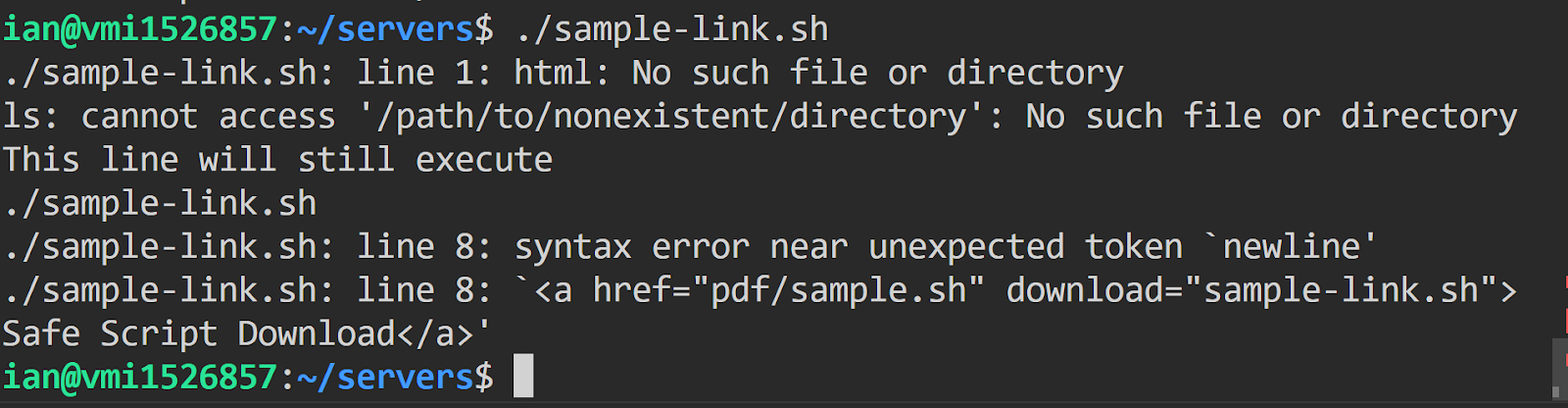
*Note the above example is run on Linux 5.4.0-167-generic #184-Ubuntu SMP Tue Oct 31 09:21:49 UTC 2023 x86_64 x86_64 x86_64 GNU/Linux Description: Ubuntu 20.04.6 LTS
So RPFI works with not only PDF, but also shell scripts on Windows WSL-2, Windows Powershell, and to a lesser degree, Linux shells. Any site letting you download shell scripts probably gives you instructions to run them that start by using ‘sudo’ to elevate privileges.
Note that Windows Defender flagged the .sh file download as a virus for me and didn’t let me open it (not the .ps1 file though). I had to turn off Windows Defender.
Also, Note that if you can use a PDF launch action to run a shell command on Windows, Linux, or macOS when the PDF is opened, you could also write a shell command that executes only the shell commands in that same PDF.
Server Template Page Injection:
The more types of files we can find that RPFI works with, the more useful this exploit will be.
So far we have .PDF, .SH, .PS1 What else can we use? It turns out that many server side template scripts will also work. These have the added benefit that they already expect the server side code to be mixed with HTML. Meaning, if a user downloads a PHP or ASP or Coldfusion file and drops it into a server to view the result in the browser, you can execute server code. Server-side code executes before client-side code is rendered and so again, these interpreters are all lenient and ignore the standard HTML rules.
This is not an exhaustive list. I’ll leave it up to others to expand on it. Injecting any of these into an HTML page, that gets downloaded and rendered on a server should execute server side:
- ASP (.asp) <% Response.Write(1+1) %>
- Python Flask (.html) {{1+1}}
- Coldfusion (.cfm) #1+1#
- PHP(.php) <?php echo 1+1; ?>
- Embedded Ruby (.erb) <%= 1+1 %>
- Perl (.pl, .cgi) <% print 1+1; %>
- Server Side JavaScript (.js,.ejs,.pug,.hbs) <%= 1+1 %>
I will only demo one of these and allow the user to extrapolate the same for all the various server pages.
If you can get persistent content injection for a PHP string <?php echo 1+1; ?> And that page has a php download, the resulting download will run as a PHP page should the user drop it into a PHP server to check it out.
<!DOCTYPE html>

<html lang="en">

<head>

    <link rel="stylesheet" href="css/style.css">

</head>

<body>

<a href="pdf/sample.php" download>Safe PHP Download</a>

<div>

    <?php

        $name = "<?php echo 1+1; ?>"; // some value you can control from the database

        if (!empty($name)) {

            echo "Welcome, $name";

        }

    ?>

</div>

</body>

</html>

Becomes sample.php on download

<!DOCTYPE html>

<html lang="en">

<head>

    <link rel="stylesheet" href="css/style.css">

</head>

<body>

<a href="pdf/sample.php" download>Safe PHP Download</a>

<div>

    Welcome, <?php echo 1+1; ?></div>

</body>

</html>
With 1000’s of file types out there, I’m sure many more will be found in the future. Binary would open many file types for exploration.
Conclusion:
All in all, I found a new parser to use when we are trying to execute JavaScript from an injection point that doesn’t allow it and a novel version of RPO for file downloads, I’ve dubbed RPFI. Along the way I learned that HTML pages can be executed as shell scripts, PDF’s, and server pages.
To mitigate this vulnerability on your own website, use a base tag to make all relative paths use a common base URL, or use relative paths that begin with a forward slash making them root relative, and use modern doc types.
Special thanks to Gareth Heyes and Ange Albertini for feedback and suggestions!
Email to: ian.hickey at ionatomics.org

 ionatomics security blog
Leave a reply to 相对路径文件注入 (xiang1dui4 lu4jing4 wenjian4 zhu4ru4) – 偏执的码农 Cancel reply